How to create an invoice in 4 steps
- Add your business details. Your name or business name, email, phone, address and logo. They’re saved in this browser, so next time you only fill in the client and the work.
- Add your client. Use the legal or trading name of the person or company paying you, plus the email of whoever handles payment. If they gave you a purchase order (PO) number, add it: many companies’ accounts payable teams won’t process an invoice without one.
- List what you’re billing for. One line per service or product, with quantity and rate. Hours work as a quantity, so 12.5 hours at $85 is a single line. Add sales tax, a discount or shipping if they apply, and record any deposit under Already paid. Totals calculate as you type.
- Set terms and how to pay, then download. Pick Net 15, Net 30 or a custom due date, add your payment details (ACH, Zelle, Venmo or a card payment link), and download the PDF to email or print. Click New invoice when you’re ready for the next one: your details stay and the number moves up by one.
What is an invoice?
An invoice is a written request for payment. It records what you sold or did, for whom, when, for how much, and when and how the client should pay. For you, it’s the start of a paper trail that supports the income in your books. For your client, it’s what their bookkeeper or accounts payable team needs to approve and release the money.
An invoice is different from the documents around it. An estimate or quote comes before the work and says what it will probably cost. A proforma invoice previews the final bill before delivery. A receipt comes after payment and confirms the money arrived. The invoice sits in the middle: the work is done (or due), and now you’re asking to be paid.
What to include on an invoice
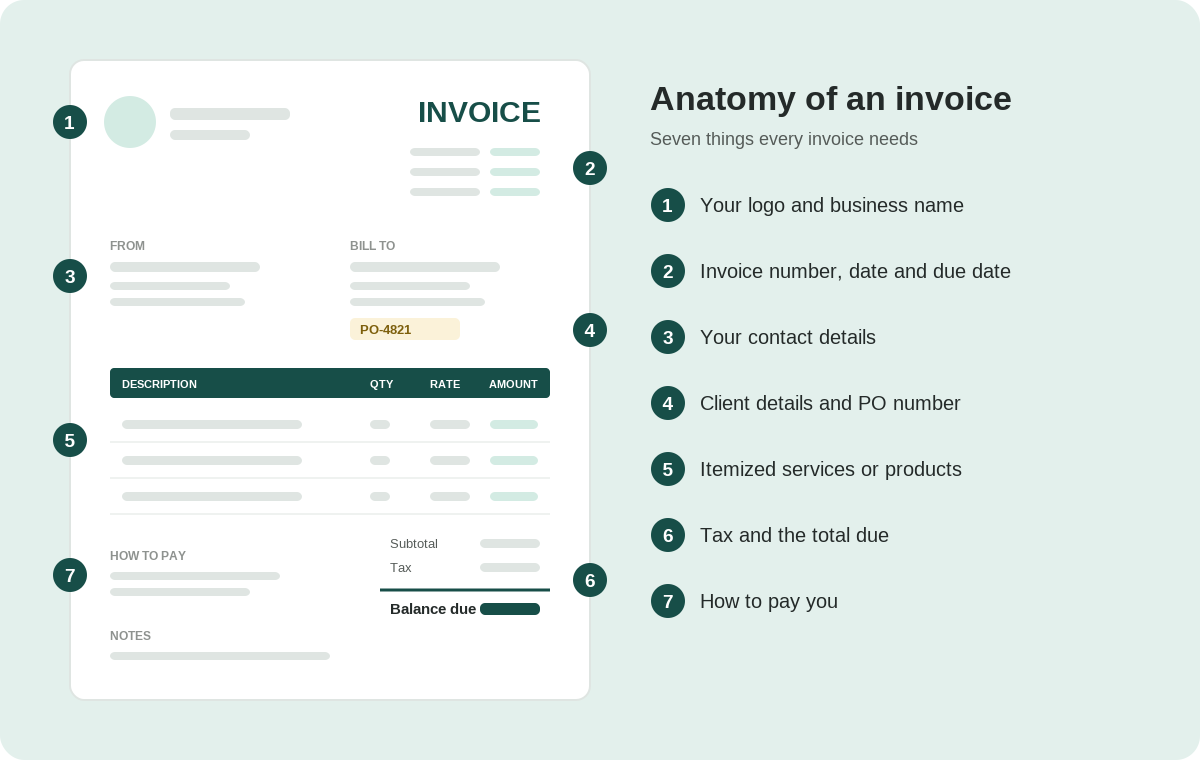
A clear invoice gets paid faster because nobody has to email you back with questions. Every invoice you send should have:
- A unique invoice number, so you and your client can find it, match it to a payment and refer to it in emails.
- The invoice date and the due date (or terms such as Net 30). Without a due date, “whenever” is a reasonable reading.
- Your details: business name, address, email and phone, so the client knows who to pay and who to call.
- Your client’s details, including the business name they’ll pay from and the right contact.
- An itemized list of services or products, with quantities, rates and line totals. Specific descriptions (“Homepage design, 2 rounds of revisions”) prevent disputes better than vague ones (“Design work”).
- Tax, discounts and the total due, stated plainly, with any deposit already paid subtracted.
- How to pay: the exact methods you accept and the details they need to pay you today.
- A PO number if your client uses purchase orders.
A filled-in example
Here’s what a complete invoice looks like for a freelance web designer billing a small business client. The names and figures are illustrative.
| From | Maya Lopez Design, Austin, TX · maya@example.com |
|---|---|
| Bill to | Bright Street Bakery LLC, Accounts Payable · ap@example.com |
| Invoice no. / PO | INV-0042 · PO-1187 |
| Dates | Invoice date Nov 3 · Terms Net 15 · Due Nov 18 |
| Description | Qty | Rate | Amount |
|---|---|---|---|
| Homepage design, 2 rounds of revisions | 1 | $1,200.00 | $1,200.00 |
| Inner page templates (menu, about, contact) | 3 | $350.00 | $1,050.00 |
| Content updates, October | 4.5 | $80.00 | $360.00 |
| Subtotal | $2,610.00 | ||
| Deposit received Oct 1 | −$600.00 | ||
| Balance due | $2,010.00 |
Notice what makes it easy to pay: the PO number the bakery’s team asked for, line items specific enough to approve without a call, the deposit already credited, and a due date rather than just “Net 15”. Under “How to pay”, this invoice would list a Zelle email and ACH details. No sales tax is shown because the designer’s state doesn’t tax this service in this example; yours may differ.
Types of invoices you can make here
The same generator covers the invoices most freelancers and small businesses send. Change the title and notes to suit:
- Standard invoice: one-off work or a sale, billed when it’s done.
- Deposit (upfront) invoice: a percentage before you start. Bill it as one line, such as “50% deposit, kitchen remodel”, then record it under Already paid on the final invoice.
- Progress invoice: for long projects, billed at milestones (“Phase 2 of 4: framing complete”).
- Recurring invoice: the same retainer or service every month. Keep the same line items and click New invoice.
- Hourly or timesheet invoice: hours as the quantity, your hourly rate as the rate, one line per task or week.
- Final invoice: the closing bill after deposits and progress payments, showing what’s left to pay.
- Credit memo: reduces what a client owes after a return or error. Title it “Credit Memo” and reference the original invoice number in the notes.
- Past-due invoice: a re-sent invoice after the due date. Keep the original number and date, and add a short note about the overdue balance.
Billing before delivery, especially for goods or international orders? Use the proforma invoice generator instead.
Line items by trade
Clients pay faster when they can see exactly what they’re paying for. Common ways to structure line items:
| Who’s invoicing | Typical line items |
|---|---|
| Freelance designer or developer | Project phases or deliverables; hourly work as hours × rate; revisions beyond those included |
| Consultant | Monthly retainer; additional hours; travel and expenses at cost |
| Contractor or handyman | Labor (hours or fixed price); materials; equipment rental; disposal; deposit credited |
| Cleaning or lawn care | Visits × rate per visit; add-on services; the service period (e.g. “November”) |
| Photographer | Session fee; edited images; prints or albums; travel; usage license |
| Small product business | Products by SKU and quantity; shipping; sales tax where it applies |
Invoicing a US business client? Get these right
Larger clients pay through an accounts payable (AP) team, and AP teams follow rules. Invoices that miss something often sit in a queue until someone notices. Before you send:
- Have a W-9 ready. Form W-9 gives your client your taxpayer identification number so they can report what they paid you to the IRS[1]. Payments to independent contractors are generally reported on Form 1099-NEC[2], so many clients ask for the W-9 before the first payment.
- Ask whether they need a PO number and put it on the invoice exactly as they gave it.
- Match the name they set you up under. If their system lists you as your business name, invoice as that business, not as yourself.
- Never reuse an invoice number. Duplicates look like double billing and get rejected.
- Send it to the right inbox. Many companies have a dedicated AP email address or supplier portal. Ask for it at the start of the project, not when payment is late.
Should you add sales tax?
It depends on where you are and what you sell. Forty-five states levy a statewide sales tax, and many cities and counties add their own local rate on top[3]. Some states tax services, others mostly tax goods. Check your state revenue department’s website, then enter the combined rate in the Tax rate field above. If sales tax doesn’t apply, leave it at zero. When an invoice mixes taxable and non-taxable items, it’s clearest to send two invoices or note which lines the tax applies to.
Choosing payment terms (and late fees)
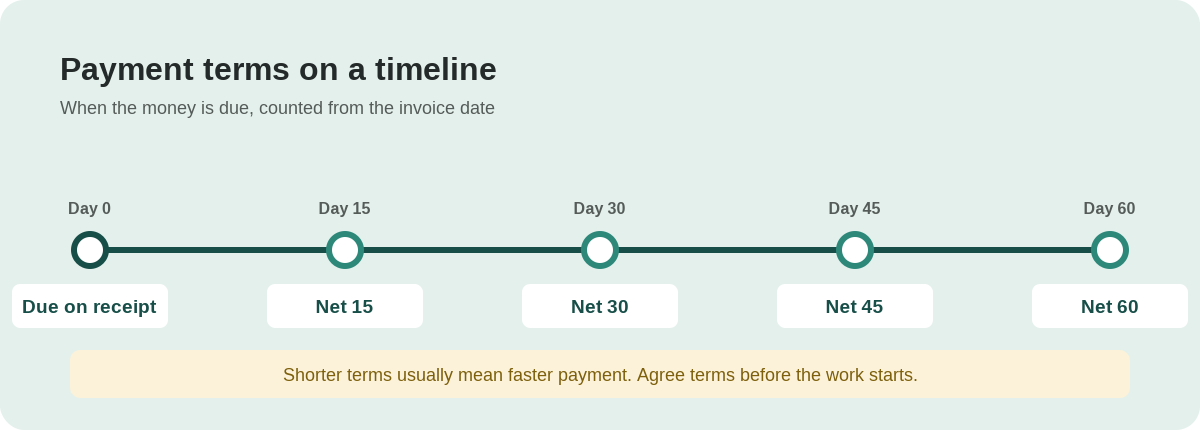
Shorter terms usually mean faster payment. Due on receipt works for one-off jobs and consumers. Net 15 is a common default for freelancers. Net 30 is what many companies expect, and some will ask for Net 45 or Net 60. Whatever you choose, agree it before you start the work and state it on every invoice.
Two optional extras: an early-payment discount such as “2/10 Net 30” (2% off if paid within 10 days, otherwise the full amount in 30), and a late fee. If you use a late fee, put it in your contract, repeat it in the invoice notes, and keep it reasonable: rules on late fees and interest vary by state.
Invoice template or invoice generator?
Both get you a professional invoice. The difference is how much of the work you do by hand.
| Invoice generator (this page) | Word, Excel or Google Docs template | |
|---|---|---|
| Math | Line totals, tax, discounts and balance calculate automatically | Manual in Word and Docs; formulas in Excel and Sheets |
| Due date | Set from your payment terms | Typed by hand |
| Numbering | Moves to the next number for you | Easy to repeat a number by mistake |
| Output | A clean PDF, ready to email or print | Export or print to PDF yourself |
| Best for | Fast, consistent invoices on any device | Heavily custom layouts you want to design yourself |
How to get paid faster
- Invoice the day the work is done. Every day you wait is a day added to your payment time.
- Make paying effortless. List every method you accept, with the details filled in. A card payment link or Zelle email gets paid sooner than “contact me for bank details”.
- Write a useful subject line: “Invoice INV-0042 from Maya Lopez Design, $2,010 due Nov 18”.
- Send a friendly reminder before the due date, not just after it. It’s the least awkward follow-up you can send.
- Follow up on a schedule once it’s late: a polite nudge on the due date, another a week later, then a call. Keep every message short, specific and friendly.
Common invoice mistakes to avoid
- No due date, or terms the client never agreed to.
- Vague line items that force the client to ask what they’re paying for.
- Missing PO number for a client that uses them.
- Wrong client name: the person you worked with instead of the company that pays.
- Duplicate or skipped invoice numbers that make your records hard to follow.
- No payment instructions, or instructions buried in an old email thread.
- Math errors from hand-typed totals. Let the generator calculate them.
Keep a copy of every invoice
Invoices are part of the records that back up the income on your tax return, alongside receipts, deposit slips and Forms 1099[4]. The IRS generally asks you to keep records for at least three years, and longer in some situations[5]. Download the PDF and file it with your books. When a client pays, send them a receipt with the free receipt maker. For more on getting paid, read the InvoiceDodo blog.
Tired of chasing late payments? InvoiceDodo is building invoicing that sends polite reminders for you, so you don’t have to. Join early access.