How to make a receipt
- Add your business details and logo. They’re remembered in this browser, and shared with the other free tools, so you only type them once.
- Add who paid you and the date the payment arrived. Use the name on the payment, which helps if the receipt is ever needed as proof.
- List what they paid for, with quantities, prices and any sales tax. If the payment settles an invoice, mention the invoice number in the line or the notes.
- Pick the payment method (card, cash, check, ACH, Zelle, Venmo, PayPal, Cash App and more), then download or print. Click New receipt for the next one: the number moves up automatically.
What is a receipt?
A receipt is a written record that a payment was made and received. It names who paid, who was paid, how much, for what, when and how. For your customer, it’s proof of purchase for returns, warranties, expense claims and their own taxes. For you, it’s part of the paper trail behind the income in your books, and it stops “did you get my payment?” emails before they start.
Receipt vs. invoice
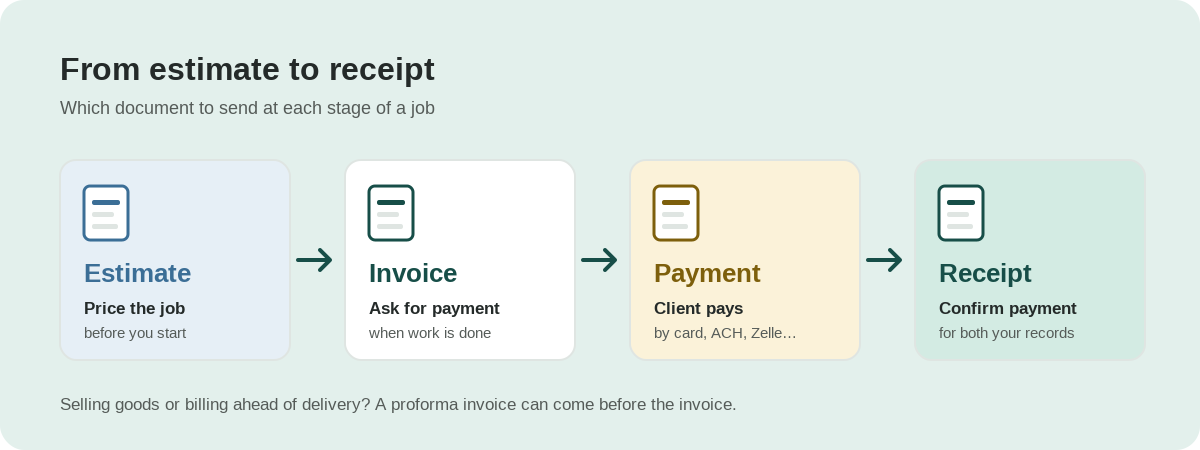
An invoice is a request for payment: it has a due date and a balance due. A receipt is proof of payment: it shows the amount paid, the date and the method. In a typical job you send an invoice first and a receipt once the client pays. In a shop or at a market, where payment happens on the spot, the receipt is often the only document. Need to bill first? Use the free invoice generator.
| Invoice | Receipt | |
|---|---|---|
| Purpose | Asks to be paid | Confirms you were paid |
| When | Before payment | After payment |
| Key dates | Invoice date and due date | Date paid |
| Shows | Balance due and how to pay | Amount paid and payment method |
What every receipt should show
- A receipt number, so either of you can find it later.
- The date payment was received, not the date of the work.
- Your business name and contact details, so the customer knows who issued it.
- The customer’s name, as it appears on the payment where possible.
- What was paid for, itemized, with amounts.
- Sales tax as its own line, if you charged it.
- The payment method and the total paid. For checks, you can add the check number in the notes.
- The balance remaining in the notes, if this was a partial payment.
A filled-in example
A lawn care business confirming a cash payment for a month of mowing. Names and figures are illustrative.
| Description | Qty | Rate | Amount |
|---|---|---|---|
| Weekly mowing and edging, 18 Elm St, October | 4 | $45.00 | $180.00 |
| Leaf cleanup (one visit) | 1 | $65.00 | $65.00 |
| Amount paid (cash) | $245.00 |
The customer gets proof they paid in full for October; the business gets a record of cash income that would otherwise leave no trace in a bank statement.
Common receipt types
The same tool handles each of these. Change the title at the top so it reads exactly as you want, such as “Cash Receipt” or “Rent Receipt”.
- Payment receipt: confirms an invoice has been paid. Reference the invoice number.
- Cash receipt: for in-person cash payments, where the receipt is the only record.
- Sales receipt: for goods sold and paid for on the spot, itemized with tax.
- Rent receipt: for tenants, showing the property, the period covered and the amount.
- Deposit receipt: confirms an upfront payment and states what it’s for and what remains.
- Service receipt: for completed jobs, listing labor, parts and materials.
Receipts by business type
Contractors and home services
Separate labor from materials, include the job address, and note any warranty on the work. For deposits, say which phase the payment covers.
Landlords
Include the property address, the rental period, and late fees as their own line if any were paid. A receipt for every cash or money-order payment protects you and your tenant.
Freelancers and consultants
Match the receipt to the invoice: same client name, same invoice number in the notes, the date the money arrived and the method.
Market sellers and small shops
Itemize products, show sales tax separately, and keep the receipt short enough to send to a phone. Repeat customers appreciate a consistent format.
Best practices for professional receipts
- Send it right away, while the payment is fresh in everyone’s mind.
- Keep numbering consistent so receipts are easy to find and match to invoices.
- Use the same branding as your invoices: logo, colors and business name.
- Be specific about what was paid for. “Services” doesn’t help anyone at tax time.
- Say thank you. A one-line note in the notes field is a small touch customers remember.
Common pitfalls
- Issuing a receipt before the money arrives. For checks and bank transfers, wait until the payment clears.
- Calling a partial payment “paid in full”. Record only what was received and state the balance.
- Leaving out the payment method, which makes the receipt harder to reconcile against your bank records.
- Not keeping your own copy. Save every PDF you send.
Digital vs. paper receipts
Both work. A digital receipt (a PDF by email or message) is easy to search, hard to lose, and the customer can forward it straight to their bookkeeper. A paper receipt suits in-person cash jobs, markets and customers who prefer something in hand. Many businesses do both: print a copy on the spot and email the PDF afterwards. Whichever you use, keep your own copy in the same place every time.
| Digital (PDF) | Paper | |
|---|---|---|
| Best for | Invoiced clients, online and remote payments | Cash on the spot, markets, walk-in customers |
| Storage | A folder per year, searchable by number | Receipt book with carbon copies, or scan your copy |
| Re-issuing | Re-send the same PDF in seconds | Write a duplicate marked “Copy” |
How to send a receipt
- Download the PDF and name it clearly, for example receipt-RCT-0108.pdf.
- Email or message it with a subject like “Receipt RCT-0108: $245.00 received, thank you”.
- Reference the invoice it settles, if there was one, so the customer can close it in their books.
- Need a replacement? If a customer loses a receipt, re-send the same PDF rather than creating a new number, so your records still show one receipt per payment.
Keep a copy for your records
Receipts, invoices, deposit slips and receipt books are the supporting documents behind the income and expenses in your books[1]. Keep a copy of every receipt you issue: the IRS generally expects records to be kept for at least three years, and longer in some cases[2]. A simple habit works: one folder per year, with each receipt PDF named by its number.
Want receipts sent automatically when a client pays? That’s part of what InvoiceDodo is building. Join early access.